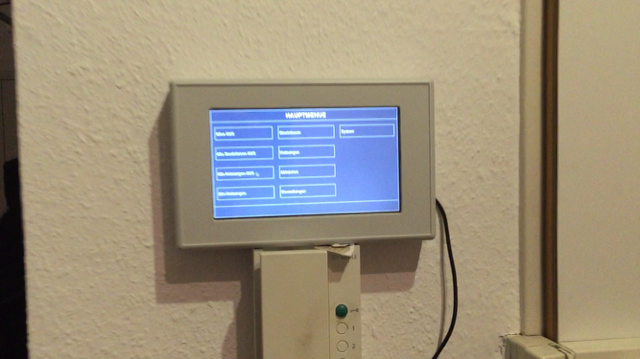
FHEM Panel (Marke: Eigenbau)

Hallöchen,
ich habe bei mir Zuhause schon länger FHEM zum Steuern einiger Steckdosen, wie aber auch Heizungen im Einsatz. Manchmal ist es aber sehr nervig, dass ich FHEM „nur“ mit Handy oder Computer ansteuern kann. Aus diesem Grunde, habe ich mir ein Wand-Panel für FHEM gebaut.
Funktionsübersicht:
– Zugriff auf Heizelemente via FHEM (Gruppen- und Einzelgeräte)
– Zugriff auf Steckdosen-/Stromelemente via FHEM (Gruppen- und Einzelgeräte)
– Zugriff auf Systeminformationen (ifconfig, route, dmesg, messages, reboot, etc)
– Zugriff auf Bahnfahrpläne aus dem Internet
– Farbumschaltung auf dem Display
Im Hauptmenü habe ich dann noch Sammelfunktionen, wie „Alles aus“ oder „Heizungen aus“ erstellt, welche in FHEM einfach wieder auf eine Struktur zurückgreifen.
Insgesamt bin ich bei den Kosten unter 100,- Euro geblieben *freu* :-)
Als Bauteile wurden dafür verwendet:
– Gehäuse
– Raspberry
– TFT Touch Screen
– Netzteil
– 12V zu 5V Stromwandler (für Raspberry)
An einigen Stellen war erfinderisches Geschick gefragt, so als Beispiel beim Anschluss vom USB Touchscreen Controller. Dieser hatte im Auslieferungszustand einen unpassenden (für das Gehäuse zu langen) USB Stecker.
Nachfolgend ein paar Bilder vom Gerät:
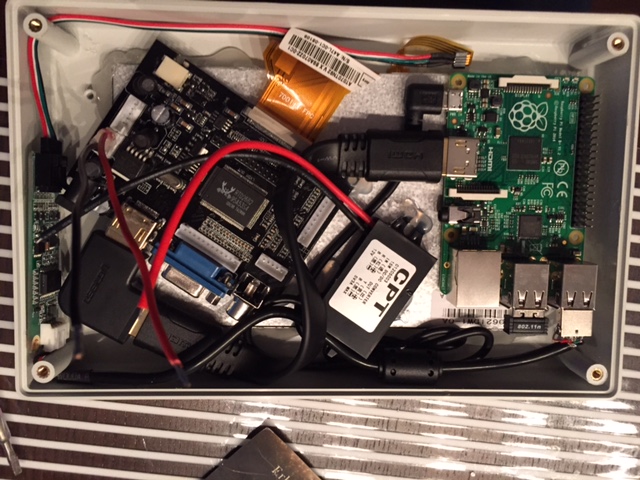
(Blick auf alle Komponenten)
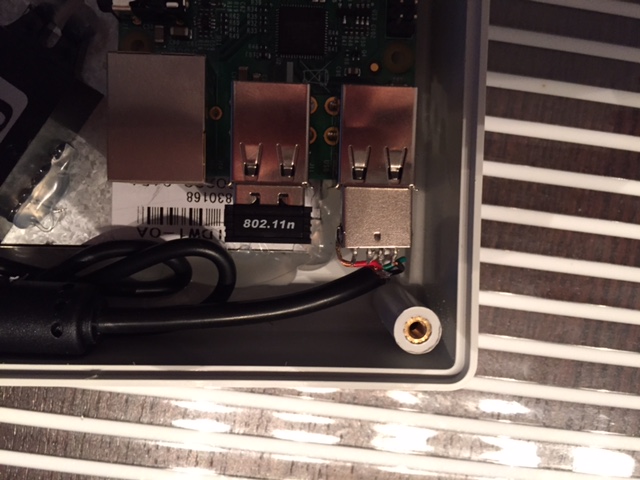
(Neu angelöteter USB-Stecker für den Touch-Controller)
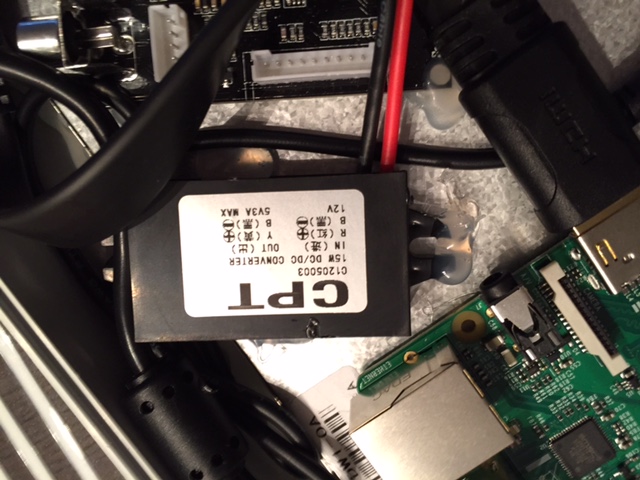
(12V zu 5V Wandler für den Raspberry; ich habe ein 12V Netzteil für den Eingangsstrom)
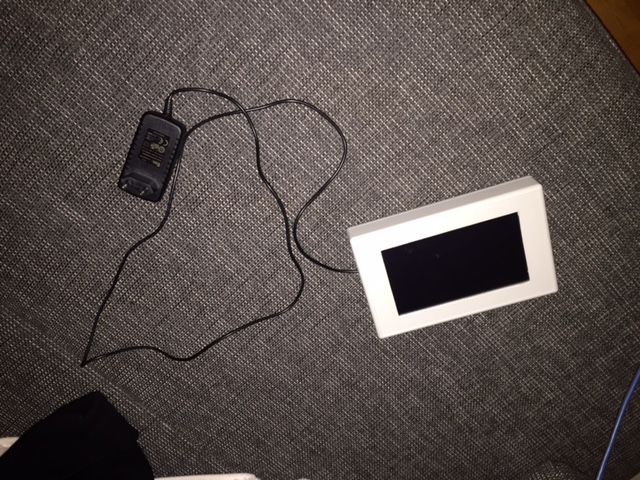
(Alles fertig im Gehäuse)
Insgesamt ging der Elektro-Part sehr fix und einfach. Viel mehr Aufwand und Zeit hat mich das Gehäuse gekostet; dieses hatte nämlich auf der Front noch kein Einlass für das Display. Mit einer ruhigen Hand, einem guten Dremel und einer guten Feile ging das dann aber auch irgendwann ;-)
Um der Hardware Leben zu geben, habe ich ein Python-Skript geschrieben, welches die Module aus pyGame nutzt um eine Oberfläche darzustellen. Das Skript hängt unten an – ist mein erstes Skript in Python, daher bitte Nachsicht bei Schnitzern in der Sprache.
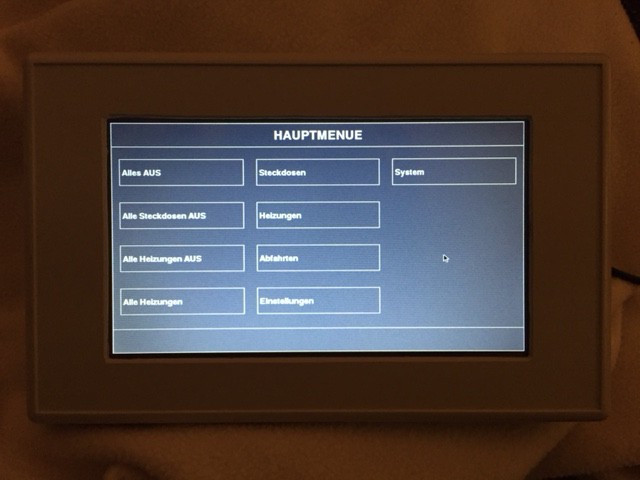
(Das Hauptmenü)
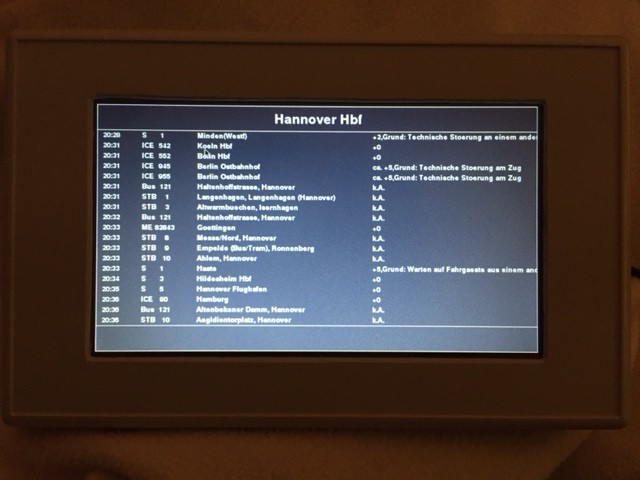
(Auskunft über die nächsten Bahn/Bus-Verbindungen)
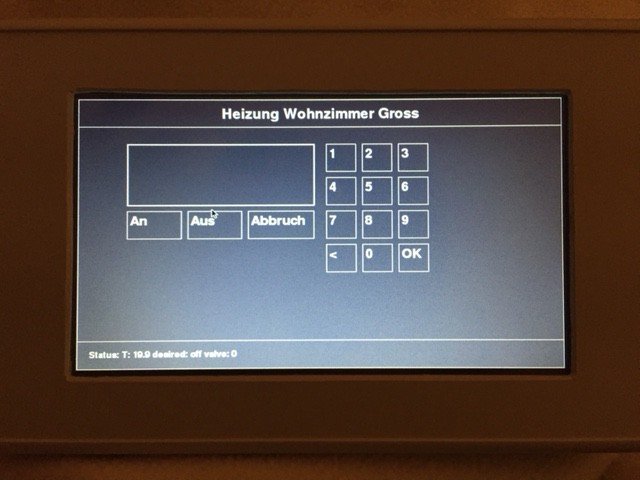
(Manuelle Eingabe von Soll-Temperaturen)
Und nun die Intelligenz vom Projekt:
import sys, pygame
from pygame.locals import *
import time
import subprocess
import os
from numpy import *
from datetime import datetime, timedelta
import telnetlib
import threading
import ConfigParser
import httplib
import urllib2
import lxml.html
import re
fhem_host = "192.168.178.1"
fhem_port = "7072"
fhem_pass = ""
os.environ["SDL_FBDEV"] = "/dev/fb0"
os.environ["SDL_MOUSEDEV"] = "/dev/input/event0"
os.environ["SDL_MOUSEDRV"] = "TSLIB"
pygame.init()
screen_width = 800
screen_height = 480
btn_width = 245
btn_height = 60
lines_page = 20
blue = (26, 0, 255)
cream = (254, 255, 250)
black = (0, 0, 0)
white = (255, 255, 255)
colors = array([["white / black", 255, 255, 255, 0, 0, 0],
["white / blue", 255, 255, 255, 26, 0, 255],
["black / white", 0, 0, 0, 255, 255, 255],
["white / dimgrey", 255, 255, 255, 105, 105, 105],
["black / slategrey", 0, 0, 0, 112, 128, 144]])
color_fg = int(colors[0][1]), int(colors[0][2]), int(colors[0][3])
color_bg = int(colors[0][4]), int(colors[0][5]), int(colors[0][6])
color_int = 0
menu = [None] * 100
menu_txt = [None] * 100
menu_pos = []
menu_cur = 0
menu_mode = "menu"
cli_out = []
cli_offset = 0
cli_lastcmd = ""
temp_txt = ""
temp_last = ""
temp_fhem = ""
temp_pos = []
fahrplan_attributes = []
def system_settings(action):
global color_fg, color_bg, color_int
sys_settings = ConfigParser.ConfigParser()
if action == "load":
print "[main] Loading Configuration from mymenu.ini"
try:
sys_settings.read("mymenu.ini")
color_int = int(sys_settings.get('mymenu', 'color_scheme'))
print "[main] color_scheme = " + str(color_int)
color_fg = int(colors[color_int][1]), int(colors[color_int][2]), int(colors[color_int][3])
print "[main] color_fg = " + str(color_fg)
color_bg = int(colors[color_int][4]), int(colors[color_int][5]), int(colors[color_int][6])
print "[main] color_bg = " + str(color_bg)
except Exception, e:
import traceback
print "[main] Could not load configuration!"
print traceback.format_exc()
if action == "save":
try:
configfile = open("mymenu.ini", 'w')
sys_settings.add_section('mymenu')
sys_settings.set('mymenu', 'color_scheme', color_int)
sys_settings.write(configfile)
configfile.close()
except Exception, e:
import traceback
print "[main] Could not save configuration!"
print traceback.format_exc()
def system_color(scheme):
global color_fg, color_bg, color_int
color_fg = int(colors[scheme][1]), int(colors[scheme][2]), int(colors[scheme][3])
color_bg = int(colors[scheme][4]), int(colors[scheme][5]), int(colors[scheme][6])
color_int = scheme
system_settings("save")
menu_message("Color set successfully!")
def make_button(text, xpo, ypo, colour, cmdtype, cmdstr):
font=pygame.font.Font(None,24)
label=font.render(str(text), 1, (colour))
screen.blit(label,(xpo,ypo+(btn_height/3)-6))
pygame.draw.rect(screen, colour, (xpo-5,ypo-5,btn_width-5,btn_height-5),1)
menu_pos.append([xpo-5, ypo-5, xpo+btn_width-5, ypo+btn_height-5, cmdtype, cmdstr])
def menu_click():
global menu_cur
click_pos = (pygame.mouse.get_pos() [0], pygame.mouse.get_pos() [1])
for entry in menu_pos:
print "checking click on: " + str(entry[0]) + " and " + str(entry[1]) + " (x,y) and " + str(entry[2]) + " and " + str(entry[3]) + " (x,y)"
if entry[0] <= click_pos[0] <= entry[2] and entry[1] <= click_pos[1] <= entry[3]:
click_pos = []
print "checking cmdtype: " + str(entry[4])
if entry[4] == "system":
print "executing cmdtype system and command " + str(entry[5])
menu_message("Executing OS: " + str(entry[5]))
pygame.display.update()
os.system(entry[5])
menu_message("Executing OS: " + str(entry[5]) + " ... finished!")
if entry[4] == "python":
print "executing cmdtype python and command " + str(entry[5])
menu_message("Executing Python: " + str(entry[5]))
pygame.display.update()
eval(entry[5])
return
def menu_layout():
global color_bg, color_fg
screen.fill(color_bg)
pygame.draw.rect(screen, color_fg, (0,0,screen_width,screen_height),1)
#pygame.draw.rect
pygame.draw.rect(screen, color_fg, (0,screen_height-50,screen_width,50),1)
pygame.draw.rect(screen, color_fg, (0,0,screen_width,50),1)
def menu_display(pos):
global menu_cur
#menu_create()
menu_layout()
menu_cur = pos
menu_pos[:] = []
starty = (btn_height / 2) + 50
startx = 20
for entry in menu[pos]:
if (starty + btn_height + (btn_height / 2)) >= screen_height:
starty = (btn_height / 2) + 50
startx += btn_width + 20
if (entry[0].find("'") == -1):
make_button(entry[0], startx, starty, color_fg, entry[1], entry[2])
else:
make_button(eval(entry[0]), startx, starty, color_fg, entry[1], entry[2])
starty = starty + btn_height + (btn_height / 2)
font = pygame.font.Font(None,36)
menu_title(str(menu_txt[menu_cur]))
return
def menu_title(mytitle):
font = pygame.font.Font(None,36)
label = font.render(str(mytitle), 1, color_fg)
labelpos = label.get_rect()
labelpos.centery = 25
labelpos.centerx = screen.get_rect().centerx
screen.blit(label, labelpos)
def menu_message(mymsg):
msgbg = pygame.Surface((screen_width-4,46))
msgbg.fill(color_bg)
screen.blit(msgbg, (2, screen_height-48))
font=pygame.font.Font(None,22)
label=font.render(str(mymsg), 1, color_fg)
screen.blit(label,(20,screen_height-35))
def FHEM_Value(dvc):
tn = telnetlib.Telnet( fhem_host, fhem_port, 5 )
tn.write( "{Value('" + dvc + "')}\n" )
print "executing fhem: " + "{Value('" + dvc + "')}\n"
#tn.read_until( "=" )
res=tn.read_until( "\n" )[ :-1 ]
tn.close()
return res
def FHEM_Cmd(cmd):
global menu_cur
tn = telnetlib.Telnet( fhem_host, fhem_port, 5 )
tn.write( cmd + "\n" )
#tn.write( "{ '=' }\n" )
#tn.read_until( "=" )
tn.close()
time.sleep(1)
#menu_create()
menu_display(menu_cur)
menu_message("FHEM Set finished!")
def FHEM_all_off():
FHEM_Cmd("set Alle_Steckdosen off")
FHEM_Cmd("set Alle_Heizungen desired-temp off")
menu_message("Alle Systeme wurden benachrichtigt!")
def cli_run(cmdtorun):
global cli_out, cli_offset, menu_mode, cli_lastcmd
cli_lastcmd = cmdtorun
cli_out = []
menu_mode = "cli"
menu_layout()
menu_title(str(cmdtorun))
font_size = 18
font = pygame.font.Font(None,40)
btn_font = font.render("<<", 32, color_fg)
screen.blit(btn_font, (10, screen_height-44))
btn_font = font.render("<", 32, color_fg)
screen.blit(btn_font, (60, screen_height-44))
btn_font = font.render(">>", 32, color_fg)
screen.blit(btn_font, (screen_width-42, screen_height-44))
btn_font = font.render(">", 32, color_fg)
screen.blit(btn_font, (screen_width-76, screen_height-44))
btn_font = font.render("ZURUECK", 32, color_fg)
btn_pos = btn_font.get_rect()
btn_pos.centery = screen_height-28
btn_pos.centerx = screen.get_rect().centerx
screen.blit(btn_font, btn_pos)
proc = subprocess.Popen(cmdtorun, shell=True, stdout=subprocess.PIPE)
font = pygame.font.Font(None,font_size)
for line in iter(proc.stdout.readline, ''):
cli_out.append(line.rstrip('\n'))
tmp_index = 0
for line in cli_out:
print "index, offset: " + str(tmp_index) + ", " + str(cli_offset)
if tmp_index >= cli_offset:
label = font.render(str(line), font_size, color_fg)
screen.blit(label, (5, 52+((tmp_index-cli_offset)*font_size)))
if tmp_index >= lines_page*((cli_offset/lines_page)+1):
break
tmp_index += 1
def cli_click():
global cli_offset, menu_mode, menu_cur
click_pos = (pygame.mouse.get_pos() [0], pygame.mouse.get_pos() [1])
if 0 < click_pos[0] < 48 and screen_height-50 < click_pos[1] < screen_height: #click on <<
cli_offset = 0
cli_run(cli_lastcmd)
if 48 < click_pos[0] < 96 and screen_height-50 < click_pos[1] < screen_height: # click on <
cli_offset -= lines_page
cli_run(cli_lastcmd)
if screen_width-96 < click_pos[0] < screen_width-48 and screen_height-50 < click_pos[1] < screen_height: # click on >
cli_offset += lines_page
cli_run(cli_lastcmd)
if screen_width-48 < click_pos[0] < screen_width and screen_height-50 < click_pos[1] < screen_height: # click on >>
cli_offset += len(cli_out) - lines_page
cli_run(cli_lastcmd)
if 96 < click_pos[0] < screen_width-96 and screen_height-50 < click_pos[1] < screen_height: # click on back
menu_mode = "menu"
cli_offset = 0
menu_display(menu_cur)
def temp_display(tmpstr, fhemdevice, displaystatus):
global temp_txt, temp_last, menu_mode, temp_fhem
menu_mode = "temp"
temp_txt = tmpstr
temp_fhem = fhemdevice
menu_layout()
menu_title(str(tmpstr))
if displaystatus > 0:
menu_message("Status: " + FHEM_Value(fhemdevice))
eingabe_cols = 3
eingabe_cur = 1
starty = 80
startx = (screen_width/2)+10
pygame.draw.rect(screen, color_fg, (80,80,(screen_width/2)-80-10,80+30),2)
font = pygame.font.Font(None, 120)
lbl_font = font.render(str(temp_last), 120, color_fg)
screen.blit(lbl_font, (85, 85))
font = pygame.font.Font(None, 32)
pygame.draw.rect(screen, color_fg, (80, 200, 90, 50),1)
lbl_font = font.render("An", 1, color_fg)
screen.blit(lbl_font, (85,205))
temp_pos.append([80, 200, 80+90, 200+50, "on"])
pygame.draw.rect(screen, color_fg, (180, 200, 90, 50),1)
lbl_font = font.render("Aus", 1, color_fg)
screen.blit(lbl_font, (185,205))
temp_pos.append([180, 200, 180+90, 200+50, "off"])
pygame.draw.rect(screen, color_fg, (280, 200, (screen_width/2)-280-10, 50),1)
lbl_font = font.render("Abbruch", 1, color_fg)
screen.blit(lbl_font, (285,205))
temp_pos.append([280, 200, 280+(screen_width/2)-280-10, 200+50, "CANCEL"])
eingabe_temp = array([["1"], ["2"], ["3"],
["4"], ["5"], ["6"],
["7"], ["8"], ["9"],
["<"], ["0"], ["OK"]])
for entry in eingabe_temp:
if eingabe_cur > eingabe_cols:
startx = (screen_width/2)+10
starty += 60
eingabe_cur = 1
pygame.draw.rect(screen, color_fg, (startx, starty, 50, 50), 1)
font = pygame.font.Font(None,32)
btn_font = font.render(str(entry[0]), 32, color_fg)
screen.blit(btn_font, (startx+5, starty+5))
temp_pos.append([startx, starty, startx+50, starty+50, str(entry[0])])
startx += 60
eingabe_cur += 1
time.sleep(2)
pygame.display.update()
def temp_click():
global temp_last, menu_mode, temp_fhem
click_pos = (pygame.mouse.get_pos() [0], pygame.mouse.get_pos() [1])
for entry in temp_pos:
if entry[0] <= click_pos[0] <= entry[2] and entry[1] <= click_pos[1] <= entry[3]:
click_pos = []
if entry[4] == "CANCEL":
menu_mode = "menu"
menu_display(menu_cur)
return
if entry[4] == "<":
temp_last = temp_last[:-1]
temp_display(temp_txt, temp_fhem, 0)
return
if entry[4] == "OK":
menu_mode = "menu"
FHEM_Cmd('set ' + temp_fhem + ' desired-temp ' + temp_last + '.0')
print "executing: " + 'set ' + temp_fhem + ' desired-temp ' + temp_last + '.0'
return
if entry[4] == "on" or entry[4] == "off":
menu_mode = "menu"
FHEM_Cmd('set ' + temp_fhem + ' controlManu ' + str(entry[4]))
print "executing: " + 'set ' + temp_fhem + ' controlManu ' + str(entry[4])
return
temp_last = temp_last + str(entry[4])
temp_display(temp_txt, temp_fhem, 0)
return
def multiarray_getfield(_array, _field):
for field in _array:
if field[0] == _field:
return field[1]
return ""
def multiarray_delfield(_array, _field):
_out_array = []
for field in _array:
if field[0] != _field:
_out_array.append(field)
return _out_array
def fahrplan_display(_attr = []):
global fahrplan_attributes, menu_mode
menu_mode = "fahrplan"
now = datetime.now()
fahrplan_baseurl = "http://reiseauskunft.bahn.de/bin/bhftafel.exe/dn?"
fahrplan_attributes = array([["country", "DEU"],
["rt", "1"],
["GUIREQProduct_0", "on"], # ICE
["GUIREQProduct_1", "on"], # Intercity- und Eurocityzuege
["GUIREQProduct_2", "on"], # Interregio- und Schnellzuege
["GUIREQProduct_3", "on"], # Nahverkehr, sonstige Zuege
["GUIREQProduct_4", "on"], # S-Bahn
["GUIREQProduct_5", "on"], # BUS
["GUIREQProduct_6", "on"], # Schiffe
["GUIREQProduct_7", "on"], # U-Bahn
["GUIREQProduct_8", "on"], # Strassenbahn
["REQ0JourneyStopsSID", ""],
["REQTrain_name", ""],
["REQTrain_name_filterSelf", "1"],
["advancedProductMode", ""],
["boardType", "dep"], # dep = Abfahrt, arr = Ankunft
["date", str(now.day) + "." + str(now.month) + "." + str(now.year)], # Datum
["input", "Hannover Hbf"], # Bahnhof/Haltestelle
["start", "Suchen"],
["time", str(now.hour) + ":" + str(now.minute)]]) # Uhrzeit
for val in _attr:
for attr in fahrplan_attributes:
if val[0] == attr[0]:
fahrplan_attributes = multiarray_delfield(fahrplan_attributes, attr[0])
fahrplan_attributes.append(val)
break
print fahrplan_attributes
menu_layout()
menu_title(multiarray_getfield(fahrplan_attributes, "input"))
fahrplan_query_url = fahrplan_baseurl
for attr in fahrplan_attributes:
fahrplan_query_url = fahrplan_query_url + str(attr[0]).replace(" ", "%20") + "=" + str(attr[1]).replace(" ", "%20") + "&"
fahrplan_query_url = fahrplan_query_url.rstrip("&")
fahrplan_query_request = urllib2.Request(fahrplan_query_url)
fahrplan_query_request.add_header("User-Agent", "Mozilla/5.0 (compatible, MSIE 11, Windows NT 6.3; Trident/7.0; rv:11.0) like Gecko")
fahrplan_query_opener = urllib2.build_opener()
fahrplan_response = lxml.etree.HTML(fahrplan_query_opener.open(fahrplan_query_request).read().replace("ü","ue").replace("ä", "ae").replace("ö", "oe").replace("ß", "ss"))
fahrplan_response_suchstring = ""
fahrplan_response_felder = array(["time", "train", "route", "platform", "ris"])
for feld in fahrplan_response_felder:
fahrplan_response_suchstring = fahrplan_response_suchstring + "@class='" + str(feld) + "' or "
fahrplan_response_suchstring = fahrplan_response_suchstring.rstrip(" or ")
fahrplan_verbindungen = []
for fahrplan_verbindung in fahrplan_response.xpath("//tr[@id]"):
tmp_verbindung = []
tmp_wert0 = lxml.etree.HTML(lxml.etree.tostring(fahrplan_verbindung))
for row in tmp_wert0.xpath("//td[" + str(fahrplan_response_suchstring) + "]"):
tmp_wert = lxml.etree.tostring(row).replace("\n","").replace(" ", "")
if tmp_wert != "" and re.sub('<[^<]+?>', '', tmp_wert) != "":
tmp_wert = lxml.etree.HTML(tmp_wert)
for feld in fahrplan_response_felder:
if tmp_wert.xpath("//td[@class='" + str(feld) + "']"):
if feld == "route":
tmp_ziel = lxml.etree.tostring(lxml.etree.HTML(lxml.etree.tostring(tmp_wert)).xpath("//span[@class='bold']")[0])
tmp_route = lxml.etree.tostring(tmp_wert).replace(tmp_ziel, "")
tmp_verbindung.append([str(feld), str(re.sub('<[^<]+?>', '', tmp_ziel)) + "-" + str(re.sub('<[^<]+?>', '', tmp_route))])
else:
tmp_verbindung.append([str(feld), str(re.sub('<[^<]+?>', '', lxml.etree.tostring(tmp_wert.xpath("//td[@class='" + str(feld) + "']")[0])))])
fahrplan_verbindungen.append(tmp_verbindung)
startx = 52
for verbindung in fahrplan_verbindungen:
if startx >= (screen_height-50):
break
font = pygame.font.Font(None,20)
btn_font = font.render(multiarray_getfield(verbindung, "time"), 20, color_fg)
screen.blit(btn_font, (10, startx))
btn_font = font.render(multiarray_getfield(verbindung, "train"), 20, color_fg)
screen.blit(btn_font, (80, startx))
btn_font = font.render(multiarray_getfield(verbindung, "route").split('-')[0], 20, color_fg)
screen.blit(btn_font, (180, startx))
btn_font = font.render(multiarray_getfield(verbindung, "plattform"), 20, color_fg)
screen.blit(btn_font, (340, startx))
btn_font = font.render(multiarray_getfield(verbindung, "ris"), 20, color_fg)
screen.blit(btn_font, (500, startx))
startx += 20
def fahrplan_click():
global menu_mode, fahrplan_attributes
click_pos = (pygame.mouse.get_pos() [0], pygame.mouse.get_pos() [1])
if 0 < click_pos[0] < screen_width/2 and screen_height-50 < click_pos[1] < screen_height: #click on back
menu_mode = "menu"
menu_display(menu_cur)
return
if screen_width/2 < click_pos[0] < screen_width and screen_height-50 < click_pos[1] < screen_height: #click on next 10 min
cur_time = multiarray_getfield(fahrplan_attributes, "time").split(':')
cur_time_now = datetime.now()
cur_time_now = datetime.strptime(multiarray_getfield(fahrplan_attributes, "time"), "%H:%M")
print str(multiarray_getfield(fahrplan_attributes, "time"))
fahrplan_attributes = multiarray_delfield(fahrplan_attributes, "time")
cur_time_plus = cur_time_now + timedelta(minutes = 10)
print str(cur_time_plus)
fahrplan_attributes.append(["time", str(cur_time_plus.hour) + ":" + str(cur_time_plus.minute)])
fahrplan_display(fahrplan_attributes)
return
return
def menu_create():
# MAIN MENU
menu_txt[0] = "HAUPTMENUE"
menu[0] = array([["Alles AUS", "python", "FHEM_all_off()"],
["Alle Steckdosen AUS", "python", "FHEM_Cmd('set Alle_Steckdosen off')"],
["Alle Heizungen AUS", "python", "FHEM_Cmd('set Alle_Heizungen desired-temp off')"],
["Alle Heizungen", "python", "temp_display('Alle Heizungen','Alle_Heizungen',0)"],
["Steckdosen", "python", "menu_display(4)"],
["Heizungen", "python", "menu_display(5)"],
["Abfahrten", "python", "menu_display(6)"],
["Einstellungen", "python", "menu_display(2)"],
["System", "python", "menu_display(1)"]])
# SUB MENU 1
menu_txt[1] = "SYSTEM"
menu[1] = array([["/var/log/messages", "python", "cli_run('cat /var/log/messages')"],
["/var/log/dmesg", "python", "cli_run('cat /var/log/dmesg')"],
["ifconfig", "python", "cli_run('ifconfig')"],
["route -n", "python", "cli_run('route -n')"],
["Sync FS", "system", "sync"],
["Reset WLAN", "python", "cli_run('modprobe -r 8192cu && usbreset /dev/bus/usb/001/004 && modprobe 8192cu && ifconfig wlan0 down && ifconfig wlan0 up')"],
["ping gw", "python", "cli_run('ping -c 4 192.168.101.1')"],
["Reboot", "system", "reboot"],
["Shutdown", "system", "shutdown -h now"],
["Exit Python", "python", "sys.exit()"],
["HAUPTMENUE", "python", "menu_display(0)"]])
# SUB MENU 2
menu_txt[2] = "EINSTELLUNGEN"
menu[2] = array([["Farben", "python", "menu_display(3)"],
["ZURUECK", "python", "menu_display(0)"]])
# SUB MENU 3
tmp_index = 0
menu_txt[3] = "EINSTELLUNGEN / FARBEN"
menu[3] = []
for entry in colors:
menu[3].append(array([entry[0], "python", "system_color(" + str(tmp_index) + ")"]))
tmp_index += 1
menu[3].append(array(["ZURUECK", "python", "menu_display(2)"]))
# SUB MENU 4
menu_txt[4] = "STECKDOSEN"
menu[4] = array([["'Schlafzimmer: ' + str(FHEM_Value('SW.Licht_Sw'))", "python", "FHEM_Cmd('set SW.Licht_Sw toggle')"],
["HAUPTMENUE", "python", "menu_display(0)"]])
# SUB MENU 5
menu_txt[5] = "HEIZUNGEN"
menu[5] = array([["Bad", "python", "temp_display('Heizung Bad', 'HZ.Bad.Temp', 1)"],
["Wohnzimmer Gross", "python", "temp_display('Heizung Wohnzimmer Gross', 'HZ.Wohnzimmer.Gross.Temp', 1)"],
["Wohnzimmer Klein", "python", "temp_display('Heizung Wohnzimmer Klein', 'HZ.Wohnzimmer.Klein.Temp', 1)"],
["HAUPTMENUE", "python", "menu_display(0)"]])
# SUB MENU 6
menu_txt[6] = "ABFAHRTEN"
menu[6] = array([["Hannover Hbf", "python", "fahrplan_display(array([['input','Hannover Hbf']]))"],
["Peine Hbf", "python", "fahrplan_display(array([['input','Peine Hbf']]))"],
["HAUPTMENUE", "python", "menu_display(0)"]])
#set size of the screen
system_settings("load")
size = width, height = screen_width, screen_height
screen = pygame.display.set_mode(size)
menu_create()
menu_display(0)
#thread_refresh = threading.Thread(target=menu_refresh, args=(), kwargs={})
#thread_refresh.start()
while 1:
for event in pygame.event.get():
if event.type == pygame.MOUSEBUTTONDOWN:
print "screen pressed" #for debugging purposes
pos = (pygame.mouse.get_pos() [0], pygame.mouse.get_pos() [1])
print pos #for checking
if menu_mode == "menu":
menu_click()
if menu_mode == "cli":
cli_click()
if menu_mode == "temp":
temp_click()
if menu_mode == "fahrplan":
fahrplan_click()
if event.type == KEYDOWN:
if event.key == K_ESCAPE:
sys.exit()
pygame.display.update()